
Consider a spend report with the same supplier listed twice. One purchasing system holds the legal name; another uses a trading name and an older address. Both rows have arrived in Fabric exactly as supplied. The person preparing the report now has to work out whether the business has two suppliers or one.
Follow that problem through the architecture and the responsibilities become clearer. Somebody needs to establish the supplier’s identity, decide which details to trust and make the result available to the next team. The decision also needs to survive the next delivery of source data.
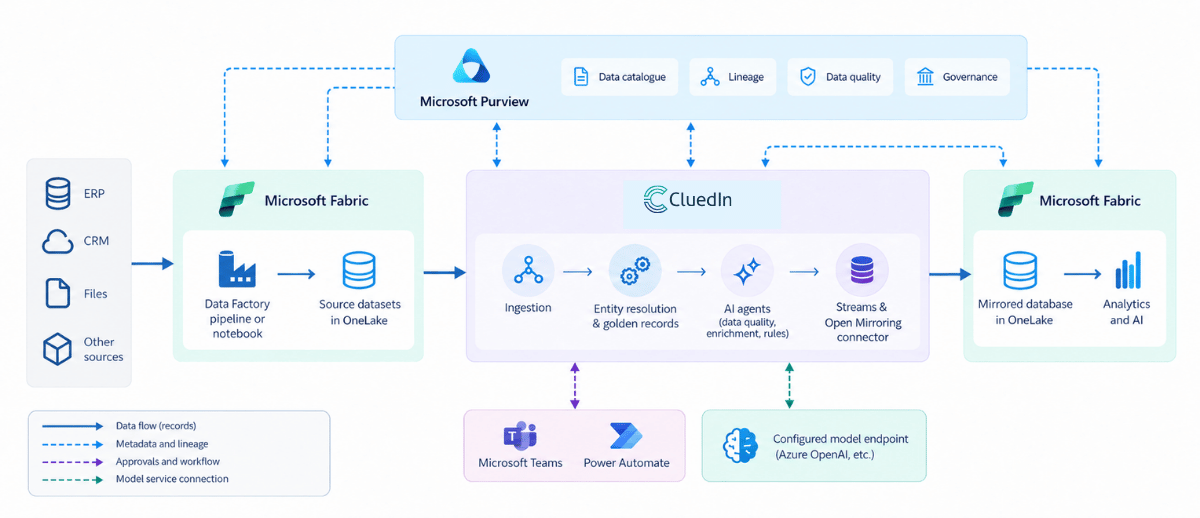
This walkthrough uses an illustrative supplier scenario to explain how Microsoft Fabric, Microsoft Purview and CluedIn can work together. It is a proposed integration pattern, not a diagram of a particular customer deployment.
Where the responsibilities sit
Microsoft Fabric provides the data and analytics environment. Its workloads cover ingestion, engineering, warehousing, data science and reporting around OneLake. In this example, Fabric holds source datasets and receives mastered outputs for downstream use.
Microsoft Purview connects governance to the estate. It supports discovery, business context and lineage. Its Fabric integration also includes data-quality checks, information protection and auditing. Consumers can find data and assess its suitability, while governance teams retain visibility across supported assets.
CluedIn maintains the shared business entities. Its graph-native Agentic Master Data Management platform combines entity resolution, golden records, quality, enrichment and governed AI agents. Here, it establishes and maintains the supplier records that Fabric workloads consume.
The boundaries deserve a conversation. Fabric can transform data, and Purview has data-quality capabilities of its own. Give each check an owner and decide where a failed check gets resolved. Two conflicting definitions of a valid supplier will create trouble whichever products you use.
Bring the selected data into CluedIn
In our example, the supplier data is already in Fabric. A working ingestion route can stay where it is. CluedIn documents a Fabric notebook approach that sends selected records to an authenticated CluedIn ingestion endpoint.
Purview can help determine which assets enter the process. Microsoft Learn’s integration exercise makes an important distinction: registering selected assets in CluedIn initially brings across metadata. Configured Azure Data Factory pipelines then copy the underlying records. A catalogue connection alone does not move the supplier rows.
The current CluedIn pipeline-automation documentation extends the available orchestration choices to Fabric Data Factory. With the integration configured, CluedIn can provision and execute pipelines for supported assets tagged in Purview with a designated glossary term. Fabric Data Factory supports Fabric tables and Fabric files, including Parquet, in this flow.
Keep the source identifiers and decide how subsequent updates and deletions will be handled. Start with the records needed for the use case. The first successful load is encouraging; the second load is where you begin to learn whether the design works.
Give the supplier a shared identity
CluedIn builds a golden record from contributing records and the processing applied to them. Those contributions, called data parts, remain available for inspection. Survivorship rules let you specify which values take precedence when sources disagree.
For the supplier in our report, procurement might trust the registered name from one system and an operational contact from another. That decision needs to be expressed deliberately. The source that updated most recently is not necessarily the most authoritative.
Before matching, agree what the entity actually represents. A legal company, its parent and a delivery site may need separate records. CluedIn’s graph can connect distinct golden records through defined relationships, so group reporting does not require every related business to be merged into one identity.
Microsoft’s architecture article describes graph-based merging and linking as part of CluedIn’s foundations. Today, the platform combines that persistent entity model with AI agents for ongoing data-management work. The graph provides business context; the jobs and controls determine what happens to the records.
The maintenance work belongs in the architecture too
The supplier record will change. Addresses age, classifications drift, and the next file may introduce another duplicate. A design that ends at the first clean dataset leaves somebody with a recurring maintenance job.
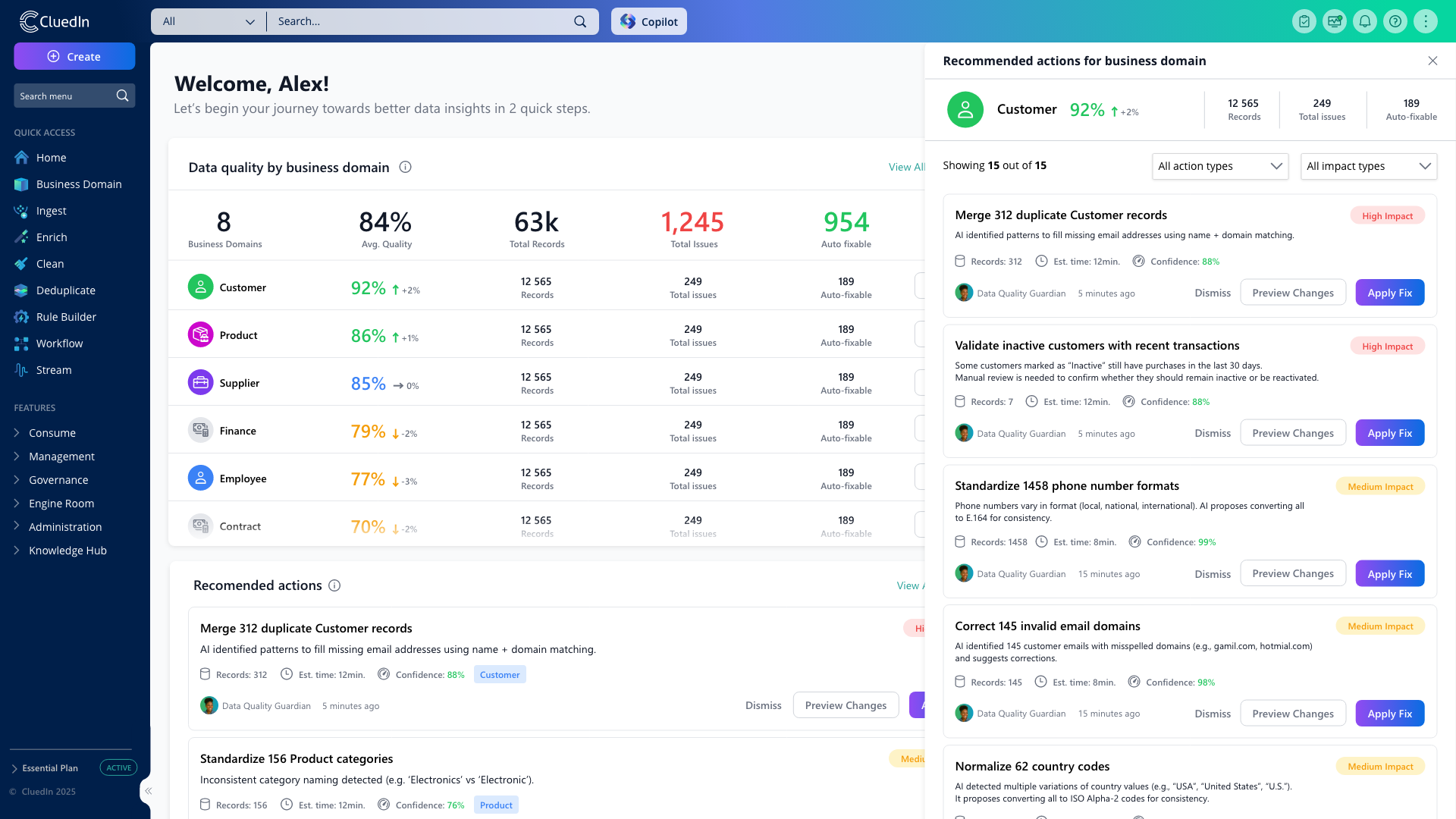
CluedIn’s built-in agent jobs include finding duplicates, suggesting data-quality fixes and proposing rules. Custom jobs let teams define work around their own data. The job configuration identifies the records, fields, model endpoint and instructions involved, with sample testing before a full run. It can also restrict processing to records modified since the last successful run.
For this supplier example, a sensible first job would check a bounded dataset for inconsistent classifications and propose corrections. Duplicate candidates could enter a separate deduplication review. These are design choices for the example, rather than a claim that a supplier workflow arrives preconfigured.
Enrichment can be recurring too. CluedIn’s 2026.02 release documents configurable enricher schedules. Where an approved enrichment source supplies missing details, the team can set a cadence appropriate to how often those details change.
For agent-generated quality fixes and rules, the results workflow supports reviewing and accepting or rejecting suggestions. The setup guide also documents administrator-enabled automatic approval. That setting is organisation-wide, so it should not be mistaken for a selective, per-record risk policy. Duplicate-match approvals remain a separate part of the deduplication process.
The chosen model service needs to be visible in the design as well. CluedIn’s setup includes the provider, deployment and endpoint configuration. Review the fields sent to that endpoint and its access arrangements alongside the data pipelines. Adding an AI box does not settle those decisions.
Publish mastered data into Fabric
A CluedIn stream defines which golden records, properties and relationships are delivered to an export target. Filters select the records; output actions can mask values without changing the golden records held in CluedIn. This gives the reporting team an agreed dataset to build against.
For supplier-spend reporting, include the identifiers needed to relate transactions to the mastered supplier. Agree how unresolved matches should appear. The analytical model also needs to use those identifiers: correcting the supplier master will not repair a report that continues joining on a trading name.
Microsoft explicitly lists CluedIn in the Fabric Open Mirroring partner ecosystem, describing its role in unifying, cleaning and governing data for Fabric analytics. CluedIn’s connector documentation provides the configuration for publishing into that route.
Once change data reaches the landing zone, Fabric’s mirroring engine manages its conversion into Delta Parquet tables in OneLake. An open mirrored database also has a SQL analytics endpoint. Fabric teams can use the resulting data in their analytical workloads without rebuilding the supplier identity logic for every report.
Keep the input datasets and mastered outputs distinct. The connector exposes an export schedule, so agree freshness across the whole path: source updates, CluedIn processing, any approval wait and downstream consumption. Test how long an accepted correction takes to appear in the report.
There is also a route for rules inside Fabric
Some quality work belongs close to the data already in OneLake. CluedIn documents how a Fabric notebook can retrieve CluedIn rule metadata, evaluate conditions and apply rule actions to data. That gives architects another option when deciding where a particular check should execute.
Use it where the documented rule pattern fits, and test the behaviour you need. A notebook applying rule logic is a distinct implementation choice from the golden-record and agent workflow described above. There is no need to force every task through the same route.
Keep the explanation connected in Purview
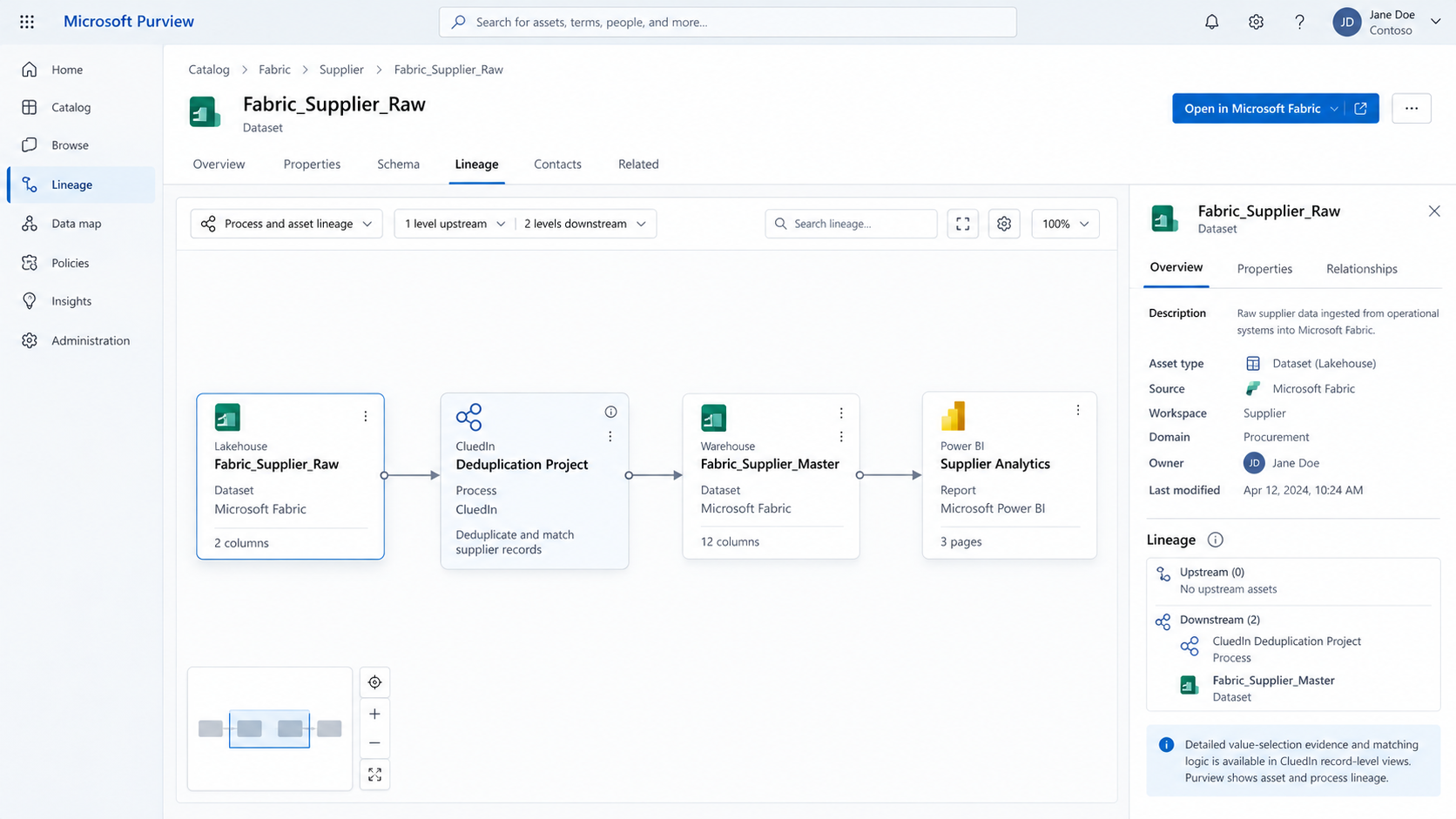
The published supplier dataset needs a place in the governance view. CluedIn can synchronise deduplication projects and streams into Purview as assets, with lineage showing their role in the processing. These synchronisation options are explicitly configured.
On the Fabric side, registration and scanning bring supported metadata and lineage into Purview. Check the resulting connections against the actual implementation. Coverage varies by asset and operation; a line on the diagram is not proof that every field-level change across every application is captured.
When the question becomes why a particular supplier value won, CluedIn provides more detailed evidence. The Explain Log identifies processing steps, rule application and value origins. Golden-record history shows the contributing data parts. These views answer different questions from the catalogue’s asset-level lineage.
CluedIn also documents how to inspect and revert agent-job changes to golden records. For our design, a correction after publication must also be propagated to consumers. Reverting the mastered value does not undo decisions already made using an earlier report.
Finish the design with the people who will use it
Our supplier match may still need a procurement decision. CluedIn’s Power Automate integration can turn platform events into workflows, with approval requests or notifications in Outlook and the Approvals app in Teams. Name the reviewer and decide what can be published while the case is open.
Keep source-system updates explicit as well. Publishing mastered data into Fabric does not by itself update the original ERP. Any write-back needs its own integration and ownership rules, including how to stop a source update being mistaken for a new independent correction.
Before extending the design, run one supplier through it all the way to a report. Reject a proposed change, accept a different one and correct something after publication. Ask the reporting owner to verify the join, and the governance owner to find the supporting evidence. Check what happens when a delivery is late.
The useful outcome is a supplier identity that the next workload can reuse, with ongoing maintenance and a way to investigate disagreements. Next month’s analyst should be able to use the decision the business has already made, rather than hunt for the spreadsheet where somebody worked it out last time.
Related reading: What agentic data operations actually look like in a Microsoft data estate.